

WORDPRESS EVENT SYSTEM FOR SMEs
Simple Event Management & Ticketing for SMEs
Create events, manage registrations, and sell tickets online without complex systems, external workarounds, or expensive platforms.
The problem
Managing events should not be this complicated.
Many small businesses end up juggling spreadsheets, email inboxes, external ticket platforms and manual attendee lists.
Common frustrations
- External platforms sending visitors away from your website
- Manual tracking of registrations and ticket numbers
- Fees or complexity that do not suit smaller events
- Disconnected event pages, forms, payments and emails
- No simple way to export attendees or check people in
The solution
Everything you need to run simple events from your own WordPress website.
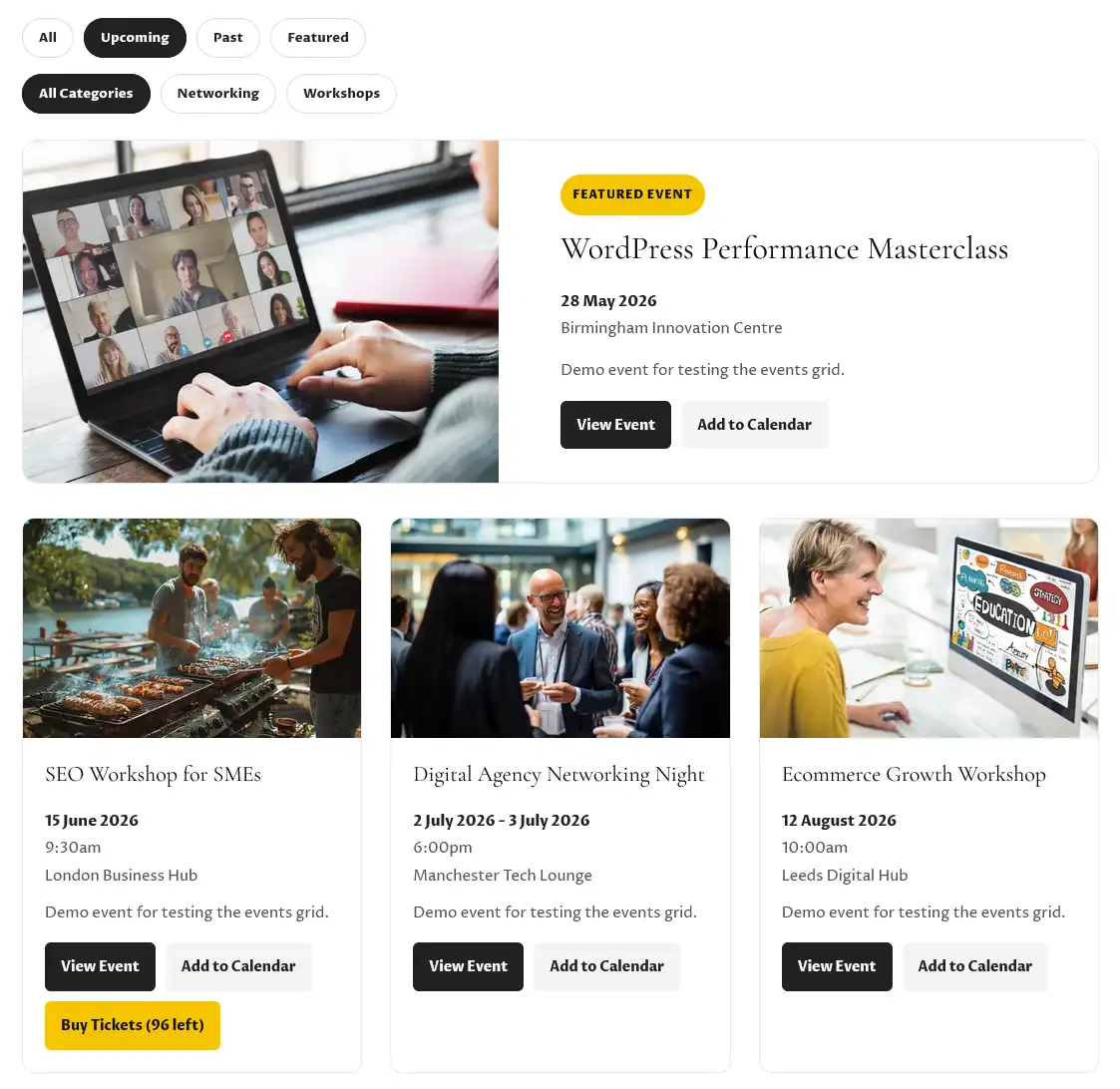
WD Events gives SMEs a practical event system that keeps event listings, registrations, ticket sales, maps, profile content and attendee management in one place.
Events Lite
Create and display events beautifully on your WordPress website.
- Event listings
- Featured layouts
- Filters and categories
- External ticket URL support
Tickets
Add free registration and RSVP functionality directly to event pages.
- Required field validation
- Capacity controls
- Attendee records
- CSV export
Tickets Plus
Sell paid tickets using Stripe Checkout and manage orders in WordPress.
- Stripe Checkout
- Paid order tracking
- Manual check-in
- Paid attendee export
Maps
Add simple Google Maps support to event pages.
- Single event maps
- Latitude and longitude support
- Address fallback
- Get directions button
Profiles
Add reusable people and organisation profiles to enrich event pages and improve attendee engagement.
- Speaker profiles
- Sponsor profiles and tiers
- Exhibitors, partners and hosts
- Profile grids and carousel layouts
Features
Designed to be simple for clients and practical for agencies.
Create and manage events
Publish upcoming events, highlight featured events, categorise event types and display clean, responsive event grids across your website.
- Unlimited events
- Upcoming, past and featured views
- Event categories and filters
- WordPress-friendly shortcodes
Collect free registrations
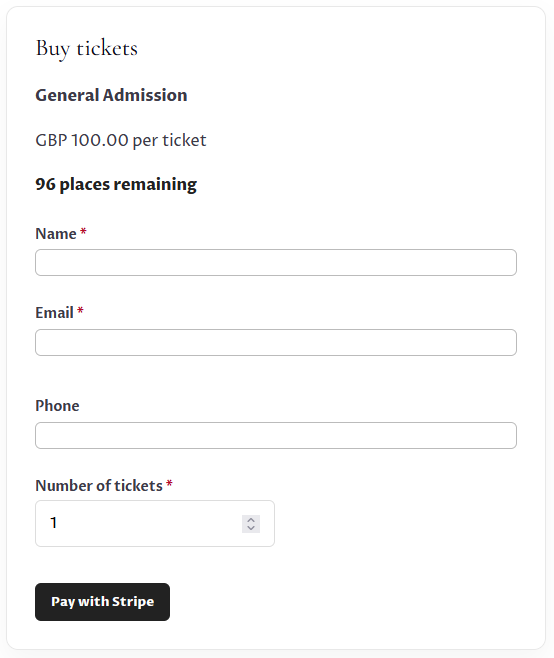
Use built-in forms for RSVP-style events, workshops, community meetings, open days, networking sessions or internal events.
- Name, email and ticket quantity required
- User-friendly validation alerts
- Capacity limits enforced
- Attendee list export

Sell paid tickets with Stripe
Take secure online payments using Stripe Checkout, then track orders and attendees inside WordPress.
- Test and live Stripe modes
- Webhook-based payment confirmation
- Paid attendee creation
- Confirmation emails
Help attendees find your events easily
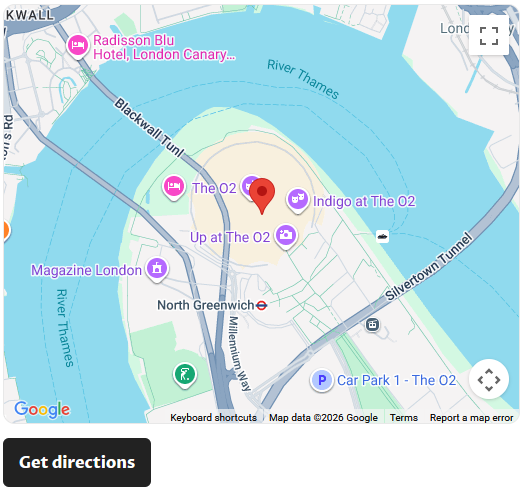
WD Events Maps adds optional Google Maps support to event pages using accurate latitude and longitude coordinates, with address fallback for simpler setups.
- Optional lightweight maps add-on
- Single event Google Maps display
- Latitude and longitude support for best accuracy
- Address fallback using the existing event address field
- Get directions button
- Ideal for venues, workshops and in-person events
Showcase speakers, sponsors and event partners
WD Events Profiles adds reusable profile management for the people and organisations involved in your events. Create a profile once and attach it to multiple event pages whenever needed.
- Speaker profiles for conferences, training and workshops
- Sponsor profiles with headline, gold, silver and bronze support levels
- Exhibitor, partner and host profile categories
- Reusable profile cards with Website, LinkedIn and Email links
- Grid layouts and optional profile carousels
- WordPress-friendly shortcodes and flexible page placement
How it works
Launch an event in six simple steps.
1
Create your event
Add event details, image, date, time, location and description in WordPress.
2
Choose ticket type
Use an external ticket link, free registration form or paid Stripe checkout.
3
Add location details
Add venue information, latitude/longitude or an address for optional map display.
4
Add profiles if needed
Attach speakers, sponsors, exhibitors, partners or hosts to enrich your event page.
5
Collect bookings
Registrations and paid orders are stored in WordPress automatically.
6
Manage attendees
Export CSVs, check attendees in manually, and keep everything organised.
Use cases
Ideal for practical, real-world business events.
Training providers
Promote courses, manage paid bookings and display trainer profiles.
Membership groups
Run meetings, networking events and member-only sessions with simple registration.
SME workshops
Host webinars, seminars, open days and local events without complicated software.
Marketing agencies
Add a lightweight event system to client websites without WooCommerce overhead.
Local businesses
Run ticketed evenings, demos, launches and in-person events from your own website.
Community organisations
Keep registrations, profile content and attendee details simple, accessible and easy to manage.
Comparison
Why not just use Eventbrite?
Admin control
Keep control without adding complexity.
Attendee records
View registrations and paid attendees in WordPress.
Order tracking
See ticket orders, status, customer details and Stripe session data.
CSV export
Export attendee data for reporting, event-day lists or follow-up emails.
Manual check-in
Mark paid attendees as checked in from the admin area.
Event maps
Add and manage optional event location maps using coordinates or address fallback.
Profile management
Create reusable records for speakers, sponsors, exhibitors, partners and hosts, then attach them to multiple events.
Validation alerts
Required fields are checked and clear alerts are shown if anything is missing.
Questions
Frequently asked questions
Does this replace Eventbrite?
For many SME events, yes. It is designed for simple event listings, registrations, paid tickets and attendee management directly inside WordPress.
Do I need Stripe?
Stripe is only needed for paid tickets. Free registrations can be handled with the standard WD Events Tickets plugin.
Can I still use Eventbrite?
Yes. WD Events Lite supports external ticket URLs, so you can link to Eventbrite or another booking platform if needed.
Does it work with Divi and other WordPress page builders?
Yes. WD Events works beautifully with Divi, Elementor, Bricks, Beaver Builder and other popular WordPress page builders, while integrating easily with most WordPress themes.
Can I add maps to event pages?
Yes. WD Events Maps is an optional add-on that displays a Google Map on individual event pages using latitude/longitude or the existing event address.
Can I add speakers or sponsors to events?
Yes. WD Events Profiles is an optional add-on that lets you create reusable profiles for speakers, sponsors, exhibitors, partners and hosts, then display them on event pages using simple shortcodes and optional carousel layouts.
What profile types are supported?
WD Events Profiles currently supports speakers, sponsors, exhibitors, partners and hosts. Sponsor tiers can include headline, gold, silver, bronze and supporter levels.
Are ticket fields required?
Yes. Name, email and number of tickets are required. If a user misses a required field, an alert message is shown above the form.
Can attendees be exported?
Yes. Both free and paid attendee lists can be exported as CSV files.
Ready to simplify events?
Start managing events, registrations and tickets from your WordPress website.
Whether you need a simple events listing, maps, speaker profiles, sponsor profiles, free registrations or paid ticketing with Stripe, WD Events gives you a lightweight system built around your website.